
Noise Reduction in Audio: Complete 2026 Guide to Best AI Tools and Techniques
Every creator knows the feeling — you record something great, then play it back and hear the fan, the hum, the street noise underneath everything.
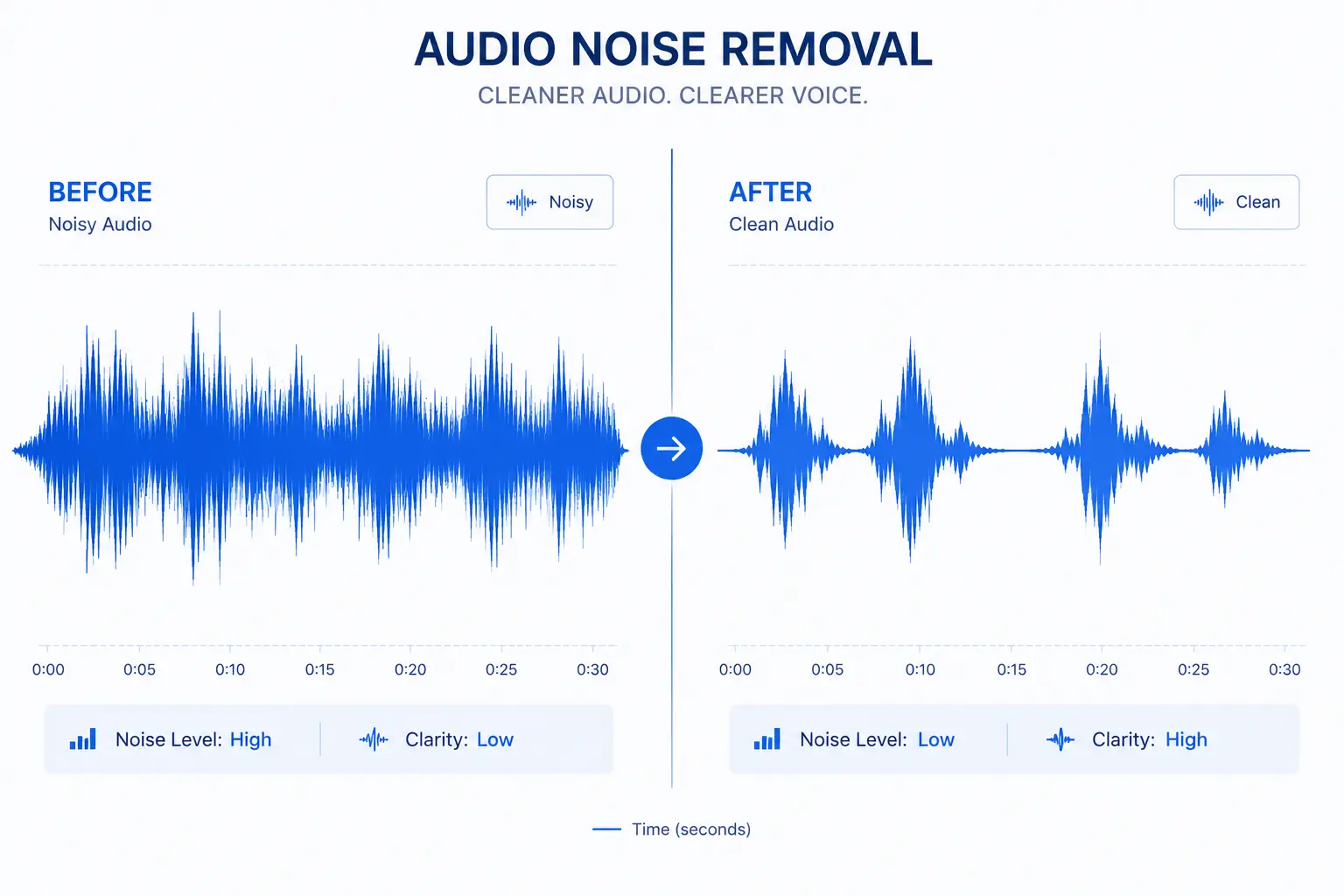
Noise reduction in audio is the process of removing unwanted sounds from a recording so the important parts—like your voice, music, or dialogue—come through clearly and naturally. In 2026, almost everyone is recording something: podcasts on phones, YouTube videos in bedrooms, Zoom calls from home offices, or music demos on laptops. Extra noise like fan hum, traffic, keyboard clicks, or that annoying 60 Hz electrical buzz can make even the best performance sound cheap and unprofessional. The goal of noise reduction is to strip away that junk while keeping the main sound untouched and realistic.
The entire field has changed massively in recent years. What used to take hours of manual EQ tweaking and trial-and-error now happens in seconds thanks to artificial intelligence that learns what real clean sound should be. But the best results still start with understanding what noise actually is and how to stop it before you even need to fix it.
What Noise Really Is and Why It Matters So Much
Noise comes in many forms, each with its own personality and source. White noise is that constant shhh you hear from a fan or TV static—equal strength across all frequencies. Pink noise feels softer because it drops off on the high end, like steady rain or wind. Brown noise goes even deeper, almost like a low rumble you feel more than hear, similar to distant thunder or ocean waves. Hiss is the sharp high-frequency sssss that comes from cheap microphones, old tape machines, or turning the gain up too high.
Hum is the low buzz at 50 or 60 Hz, almost always caused by electrical problems—bad grounding, power cables, or lights. Rumble is subsonic shaking below 20 Hz, usually from wind hitting the mic, footsteps, or trucks outside. Pops and clicks are sudden sharp sounds from mouth plosives (the “p” and “b” explosions), cable taps, or bad connections. Room reverb makes everything sound distant and hollow because the voice bounces off hard walls.
Most of these noises come from three main places: the environment around you, the equipment you’re using, or the way you’re recording. A noisy room with hard surfaces adds echo and ambient sounds. A low-quality microphone adds its own hiss (called self-noise). Speaking too far from the mic lets the whole room in. Using too much gain amplifies everything bad along with the good. The signal-to-noise ratio (SNR) tells you how bad it is—a clean pro recording might have 60 dB or more, while a noisy phone call often sits at 20–30 dB. The higher the SNR, the cleaner it sounds.
Prevention: Stop Noise Before You Have to Fix It
The smartest thing you can do is prevent noise before it ever gets recorded. Prevention beats correction every single time. Record in a quiet space—ideally a room with carpets, curtains, blankets, or clothes hanging around to kill echo. A closet full of clothes works surprisingly well. Use a microphone with low self-noise (under 15 dB-A is excellent). Keep the mic close to your mouth—6 to 12 inches—so your voice is loud and the background is quiet. Use a pop filter to stop plosive explosions on “p” and “b” sounds. Put a furry wind shield outside or in windy rooms. Run all your gear from the same power strip to avoid ground loops that cause hum.
Test with headphones first—hear any buzz? Fix it now. Set your input gain medium—too high adds hiss, too low forces you to turn it up later and noise gets louder. If you follow these habits consistently, you’ll need 50–70% less cleaning work after recording.
Basic Noise Reduction Techniques: Start Simple and Effective
But even with perfect setup, some noise always sneaks in. That’s when you start cleaning.
Noise Gating
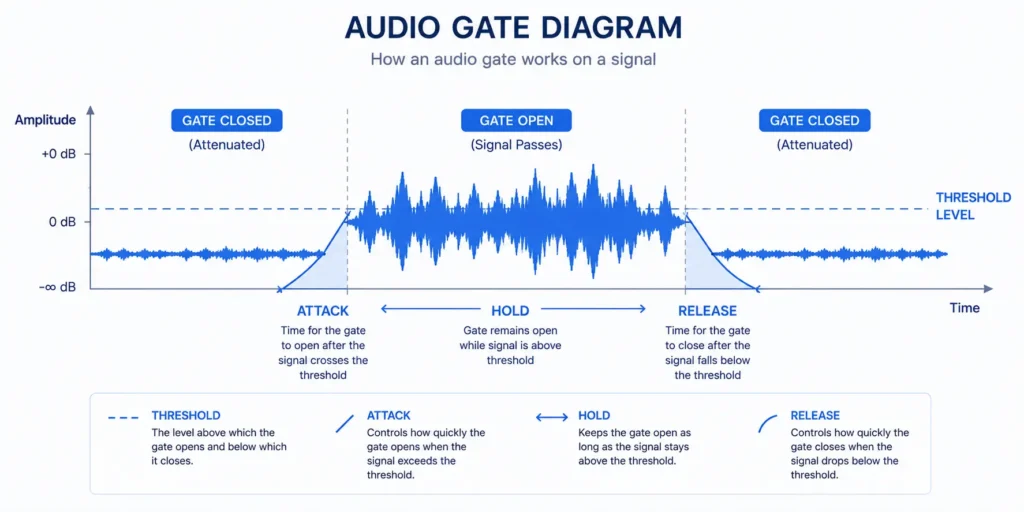
The most basic technique is noise gating. A gate works like an automatic on/off switch. Anything quieter than a certain level gets muted. You set the threshold just above the noise floor—usually between -40 and -50 dB. Attack and release times control how fast the gate opens and closes so you don’t get choppy words or chattering. Hold time prevents rapid open/close cycles. Gating is perfect for speech because it kills hum or room noise during pauses. It can remove 10–25 dB of steady background noise. The only problem is if the threshold is too high, it starts cutting the ends of soft words or breaths. Too low, and noise leaks through.
Equalization (EQ)
Equalization, or EQ, is another simple and powerful method. It lets you cut specific frequencies where noise lives. A high-pass filter removes everything below 80–120 Hz, wiping out rumble and wind. A low-pass filter cuts above 8–12 kHz to kill hiss. A narrow notch filter targets that exact 60 Hz hum from electricity. You look at a spectrogram—that colorful picture of frequencies over time—and see exactly where the bad stuff is. Cut those spots by 6–12 dB and the recording instantly sounds clearer. EQ improves the signal-to-noise ratio by 10–20 dB when the noise is steady. The downside is over-cutting can make voices sound thin or dull.
Spectral Subtraction
Spectral subtraction takes things one step further. You find a short silent part of the recording that contains only noise, tell the software “this is the bad stuff”, and it subtracts that same noise pattern from the whole file. In Audacity you do this for free: select 5–10 seconds of pure noise, get the noise profile, select the full track, and apply 12–24 dB reduction with smoothing. It works very well on constant noise like fans or air conditioners, removing 10–30 dB. The catch is that if the noise changes even slightly during the recording, you get “musical noise”—those weird tinkling or watery artifacts.
Intermediate Techniques: Handling Changing Noise
When basic methods aren’t enough, you move to intermediate techniques that adapt to changing noise.
Multiband Compression
Multiband compression splits the audio into separate frequency ranges—low, mid, high—and compresses each one independently. Rumble in the low end gets crushed hard, hiss up high gets tamed, while the voice range (1–4 kHz) stays mostly natural. Sidechain detection makes it even smarter by reacting to what’s actually in the signal. You can pull 20–40 dB of reduction without the whole track sounding squashed or unnatural. This method is common in professional plugins like Waves C6 or FabFilter Pro-MB.
Adaptive Filtering
Adaptive filtering is where the processor starts feeling intelligent. It listens to the noise as it happens and keeps changing its settings. The Wiener filter is the classic one—it uses statistics to predict the cleanest possible version of the signal. Least mean squares (LMS) is the algorithm that powers most adaptive systems; it learns on the fly by constantly updating its filter weights. These techniques are the foundation of active noise cancellation in headphones and work great for non-stationary noise.
Spectral Gating
Spectral gating takes gating to the next level. Instead of one big gate for the whole sound, it gates each tiny frequency bin separately. You open the spectrogram, see the noise as bright spots, and tell it to quiet only those spots. This gives 30 dB or more reduction on complicated noise, but you have to be careful or you get bubbling artifacts.
Advanced Noise Reduction: The AI Revolution in 2026
Now we reach the biggest change in the last few years: artificial intelligence and deep learning. These systems have been trained on millions of hours of noisy and clean recordings. They learn exactly what human speech and music should sound like and what doesn’t belong.
RNNoise — Real-time, free, Mozilla’s (low latency ~10ms)
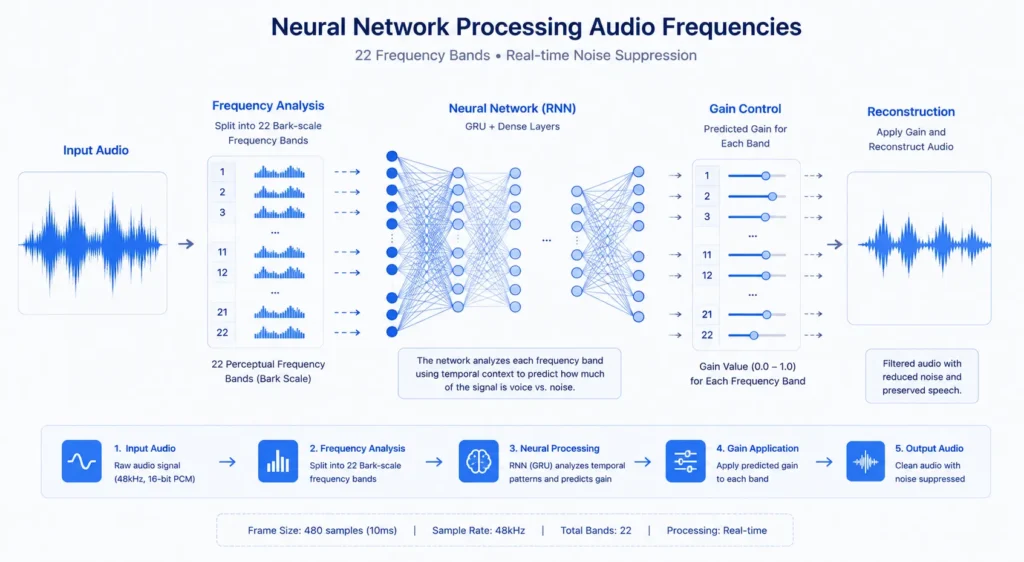
RNNoise, released by Mozilla in 2017, is still one of the most popular real-time solutions because it’s free, open-source, and incredibly efficient. It combines classic digital signal processing with a small recurrent neural network that predicts suppression gains across 22 frequency bands based on human hearing. It processes audio in short frames with very low latency—usually 10 to 20 milliseconds—so you don’t notice any delay.
RNNoise delivers solid perceptual quality, with PESQ scores around 3.88 and STOI near 0.92. It runs smoothly even on low-power devices like phones or Raspberry Pi. Because it’s lightweight and reliable, it’s used everywhere: Discord, VoIP apps, web browsers, and open-source projects.vFor a deep dive into how RNNoise works and how to set it up on every platform, read our complete RNNoise guide.
DeepFilterNet 2 — Best for voice calls, very low artifacts
DeepFilterNet 2, developed in 2022 by researchers in Germany, was a major step forward for full-band real-time noise suppression. It predicts complex filters for every frequency bin and was trained on huge datasets of real-world noise. Latency stays under 20 milliseconds on modern smartphones and embedded devices. Artifacts are almost non-existent, and it consistently beats RNNoise in sound quality, with PESQ scores from 3.17 to 3.5 and STOI around 0.944. It’s especially strong for voice calls and communication, where natural speech is critical.
DeepFilterNet 3 (2025-2026 updates) — even better quality
DeepFilterNet 3, updated throughout 2025 and early 2026, took the model even further. It adds more layers, trains on bigger data, and handles more complex noise like synthetic AI voices or crowded places. Latency remains 10–20 ms. PESQ now 3.5–4.0+, STOI over 0.95. The difference is audible—cleaner speech with even fewer leftover weird sounds.
NSNet2 (Google) — Chrome aur Android mein use hota hai
NSNet2 is Google’s answer. Designed specifically for non-stationary noise—sounds that change quickly like sudden interruptions or people talking over each other. Recurrent network, under 20 ms latency, built right into Chrome, Android, Google Meet. PESQ 3.86–4.2, STOI around 0.90. If you’re doing web or mobile calls, this is probably running in the background already.
MetricGAN / DEMUCS — music ke liye killer
MetricGAN trains directly on what humans think sounds good (perceptual metrics), so the cleaned speech feels very natural—PESQ often above 4.0. DEMUCS (from Meta) is incredible at source separation; it pulls vocals or instruments out of noisy backgrounds like it’s magic. Both are offline, higher latency (100–1000 ms), but the quality is outstanding for music production, old recording cleanup, and complex audio repair.
These AI methods have completely changed noise reduction. Traditional tools use fixed rules. AI learns patterns. It can separate your voice from a fan even when they’re overlapping. Latency is now low enough for live use. Artifacts are almost gone. Quality scores that used to top out at 3.0–3.5 now regularly hit 4.0+.
Professional tools combine these algorithms for real results. iZotope RX mixes spectral editing with deep learning and can remove 30–50 dB across music and film. Adobe Audition has adaptive noise reduction with AI built in. Krisp uses deep learning models for real-time calls. Noise Reducer AI processes your file in the browser — upload any MP3, WAV, MP4 up to 900MB and get clean audio in seconds.
Important Tip: Always Start Clean
The single most important tip is always to start clean. A quiet room, good microphone, proper technique—these save you hours of work later. Then apply the right tool for the remaining noise. In 2026 you really don’t have to live with noisy audio — Noise Reducer AI cleans any file in seconds, free.
Choosing the Right Method: Quick Decision Guide
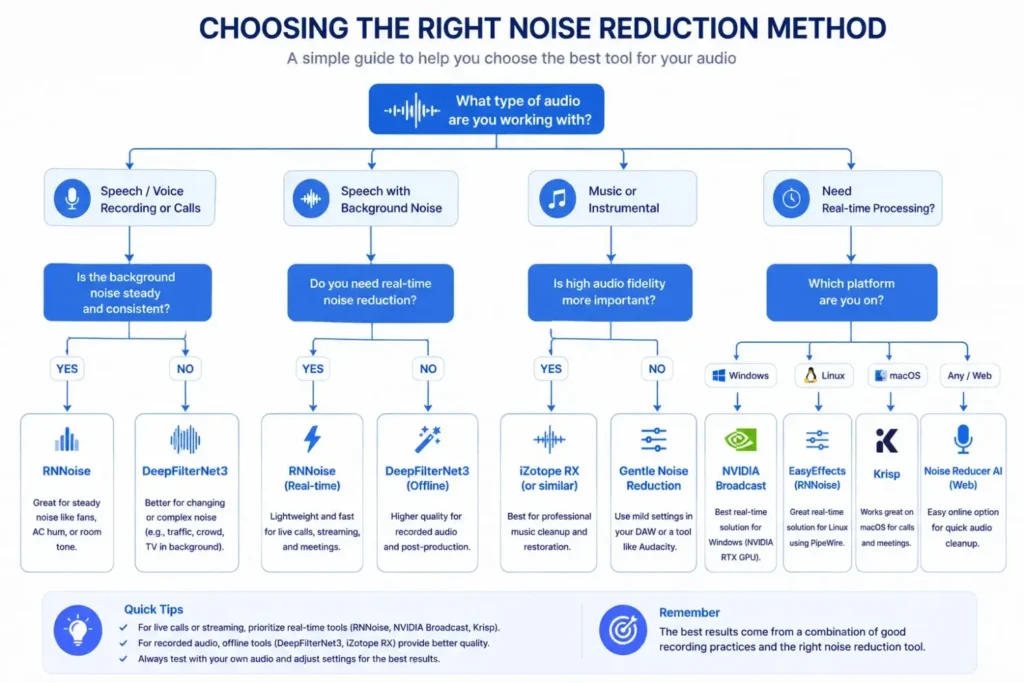
Choosing the right method for noise reduction depends on your situation. Steady noise like fan hum or electrical buzz responds well to basic EQ and gating. Changing noise like traffic or people talking needs adaptive filtering or AI models like DeepFilterNet or NSNet2. Real-time applications (calls, streaming, gaming) require low-latency algorithms such as RNNoise or DeepFilterNet3. Music restoration or heavy cleanup benefits from offline models like DEMUCS or MetricGAN.
Important Tip: Always Start Clean
The single most important tip is always to start clean. A quiet room, good microphone, proper technique—these save you hours of work later. Then apply the right tool for the remaining noise. In 2026 you really don’t have to live with noisy audio — Noise Reducer AI cleans any file in seconds, free.
Choosing the Right Method: Quick Decision Guide
Choosing the right method for noise reduction depends on your situation. Steady noise like fan hum or electrical buzz responds well to basic EQ and gating. Changing noise like traffic or people talking needs adaptive filtering or AI models like DeepFilterNet or NSNet2. Real-time applications (calls, streaming, gaming) require low-latency algorithms such as RNNoise or DeepFilterNet3. Music restoration or heavy cleanup benefits from offline models like DEMUCS or MetricGAN.
Noise Reducer AI is an AI-powered audio enhancement platform designed to remove background noise, improve voice clarity, and enhance sound quality. Built for creators, professionals, and everyday users, it offers a fast, free, and easy way to clean audio without technical complexity.
Frequently Asked Questions
Check out these frequently asked questions to find quick answers and helpful tips!