
DeepFilterNet Technical Guide: Parameters, Sample Rate, Latency, and Audio Length Explained
DeepFilterNet is widely used as an open-source AI noise suppression framework, but many users struggle to understand its technical behavior. Questions about model parameters, supported sample rates, latency, and minimum audio length are common, especially among developers and advanced users working with real-time or short audio clips. This guide explains the technical side of DeepFilterNet in simple, practical terms. Instead of focusing on marketing claims, it breaks down how the system behaves in real use, why certain limitations exist, and how to configure it correctly for reliable noise reduction.
You can read the comparison between DeepFilterNet vs DeepFilterNet2 and DeepFilterNet3 here. If you want to skip the technical setup and clean audio instantly, Noise Reducer AI uses DeepFilterNet-powered AI — upload any file and get clean audio in seconds.
DeepFilterNet Parameters Explained in Detail
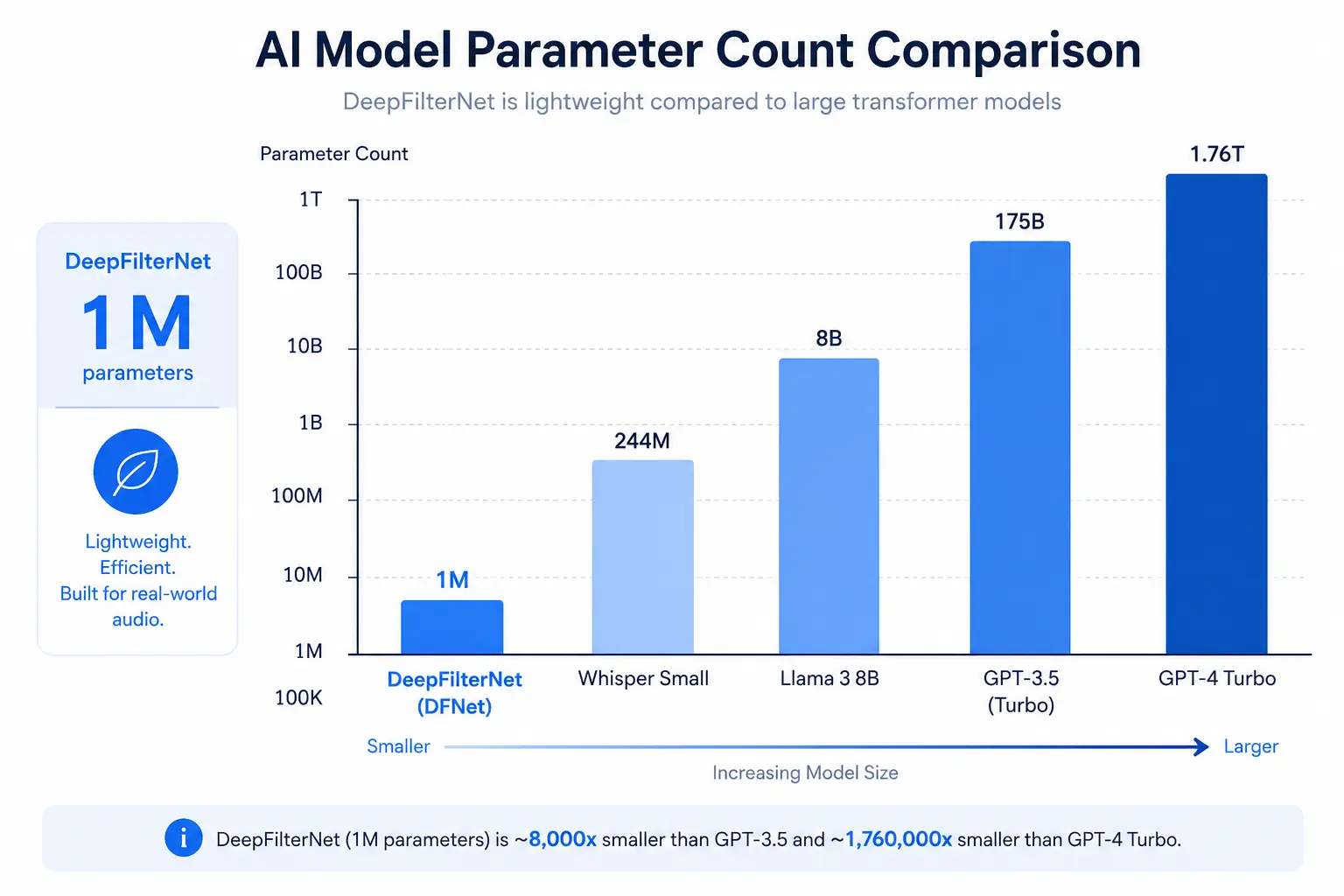
One of the most searched technical aspects of DeepFilterNet is its number of parameters and how model size affects performance. Unlike large transformer-based speech enhancement models, DeepFilterNet uses a compact neural architecture designed for efficiency. Across different versions, the number of parameters stays close to one million, which is extremely small by modern deep learning standards. This low parameter count is intentional. It allows DeepFilterNet to run in real time on CPUs without requiring a GPU.
Fewer parameters also reduce memory usage and help maintain stable latency, which is critical for live audio applications. Although newer versions slightly increase complexity to improve perceptual quality, the framework remains lightweight compared to most AI noise reduction models. In practice, this means DeepFilterNet can be deployed on laptops, smartphones, and embedded devices without sacrificing responsiveness or audio continuity.
DeepFilterNet Sample Rate Support
Another frequent question is about DeepFilterNet sample rate compatibility. DeepFilterNet supports full-band audio processing and works effectively at common sample rates such as 16 kHz, 44.1 kHz, and 48 kHz. Lower sample rates are typically used for voice calls and voice assistants, while higher rates preserve more high-frequency detail for podcasts, videos, and professional recordings.
Internally, DeepFilterNet processes audio in short overlapping frames, which makes it largely independent of the chosen sample rate as long as the input remains consistent. Problems usually occur when audio is resampled inconsistently or when different sample rates are mixed in a single processing pipeline. For best results, audio should be resampled to a fixed rate before being passed into the model. This ensures stable suppression behavior and avoids quality degradation caused by repeated resampling.
DeepFilterNet Latency in Real-Time Applications
Latency is one of DeepFilterNet’s strongest technical advantages. The framework is designed to introduce minimal delay, making it suitable for live calls, streaming, and interactive voice systems. In most setups, end-to-end latency stays between 10 and 20 milliseconds, which is below the threshold of human perception. This low latency is achieved through short frame sizes and efficient overlap-add processing. Because the model does not rely on long context windows or heavy attention mechanisms, it can process audio continuously without buffering large chunks of data.
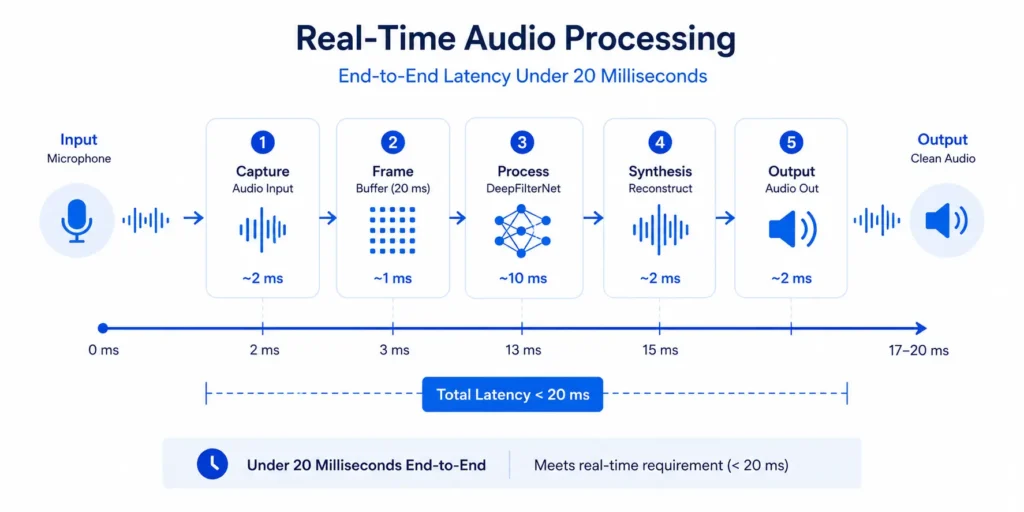
In real-world usage, this means users can speak naturally without hearing noticeable delays, even when noise suppression is enabled. For developers, predictable latency simplifies synchronization with video and other real-time streams.
DeepFilterNet Minimum Audio Length Requirement
A common source of confusion is the DeepFilterNet minimum audio length requirement. While the model can technically process very short audio segments, it needs a minimum amount of temporal context to estimate noise accurately. When clips are too short, the model does not have enough information to distinguish speech from background noise.
In practical terms, short clips may suffer from incomplete suppression at the beginning and end of the audio. This is not a bug but a limitation of how noise estimation works. DeepFilterNet relies on patterns across multiple frames, and extremely short inputs reduce its ability to stabilize predictions. For reliable noise suppression, short audio should be padded with silence or extended slightly. This allows the model to maintain smoother suppression and avoids abrupt artifacts.
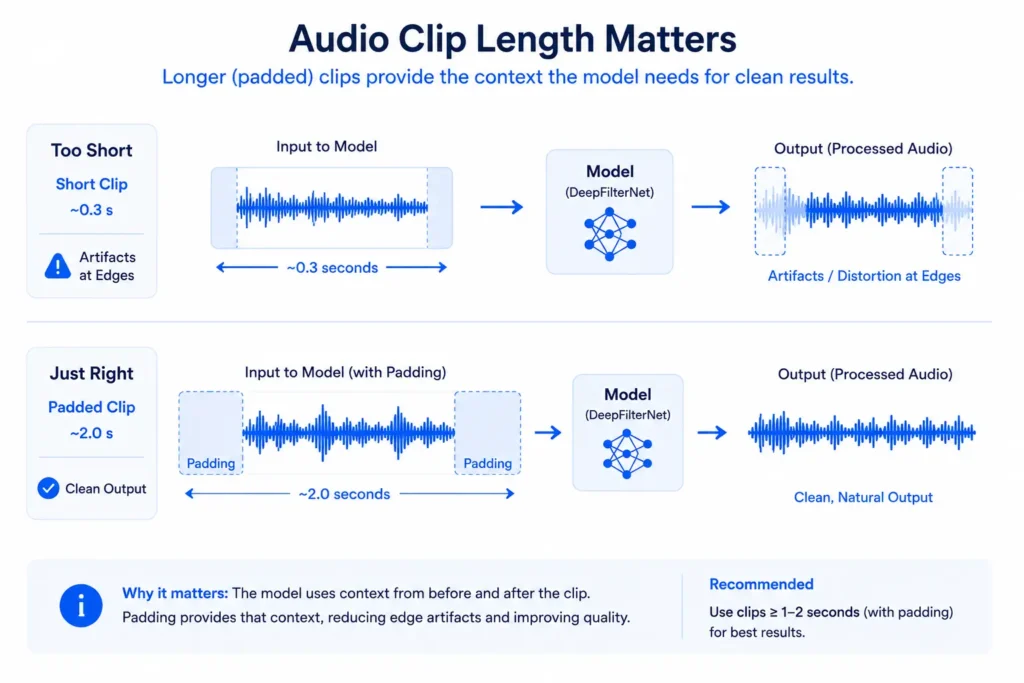
In practice, DeepFilterNet performs best when the audio clip is at least 300–500 milliseconds long, although longer segments (1 second or more) produce more stable noise suppression. Extremely short clips provide insufficient context for accurate noise estimation.
DeepFilterNet Behavior on Short Audio Clips
Short audio noise reduction is one of the areas where DeepFilterNet has improved significantly over time. Earlier versions struggled with clips under a few hundred milliseconds, often producing unstable output. Newer versions handle short audio much more consistently, especially in dynamic noise environments.
However, even with these improvements, short clips still benefit from additional context. Padding or overlapping frames help the model maintain continuity and avoid edge effects. This is especially important for voice commands, sound effects, and trimmed recordings where natural flow matters. Understanding this behavior helps users avoid unrealistic expectations and configure their pipelines correctly.
Training Segment Length vs Inference Audio Length
Many users wonder why DeepFilterNet behaves differently during training compared to real-world usage. During training, the model is exposed to longer audio segments. These longer segments help it learn stable speech and noise patterns across time.
At inference, the model does not require the same segment length, but its predictions are more reliable when inference conditions resemble training conditions. This is why short audio padding improves results. The model is not failing on short clips; it simply performs better when given enough context to apply what it learned during training. This distinction is important for developers building real-time or clip-based systems.
DeepFilterNet Noise Suppression vs Speech Preservation
Noise suppression systems often face a trade-off between removing noise and preserving speech quality. Over-aggressive suppression can make voices sound robotic or unnatural. DeepFilterNet addresses this problem by learning suppression behavior from real-world data rather than relying on fixed thresholds. As a result, it adapts to changing noise conditions while preserving vocal characteristics. This is particularly noticeable in environments with non-stationary noise such as traffic, crowds, or background conversations.
The model prioritizes intelligibility and natural sound over absolute silence, which makes it more suitable for communication-focused applications.
Open-Source Design and Practical Integration
DeepFilterNet is fully open source, which makes it attractive for both research and production use. Developers can inspect the code, modify components, and integrate the model into custom pipelines. Pretrained models and example scripts make experimentation accessible even for beginners.
Common use cases include real-time noise suppression for calls, preprocessing for speech recognition, and audio cleanup for content creation. The open-source ecosystem also allows the community to improve performance, fix issues, and adapt the framework to new environments.
When to Use DeepFilterNet from a Technical Standpoint
DeepFilterNet is best suited for applications that require real-time noise reduction, low latency, and CPU-friendly performance. It excels in voice-focused scenarios, short audio processing, and embedded systems where resources are limited. While heavier models may outperform it in offline batch processing, DeepFilterNet offers one of the best balances between quality, speed, and practicality for real-world audio systems. For a complete overview of all noise reduction methods including DeepFilterNet, RNNoise and NSNet2, read our complete noise reduction guide.
Final Thoughts
Understanding DeepFilterNet’s technical behavior helps users get better results and avoid common mistakes. Its compact architecture, flexible sample rate support, low latency, and strong handling of short audio make it a reliable choice for modern noise suppression tasks.
When used with proper audio length, consistent sampling, and realistic expectations, DeepFilterNet delivers clean, natural results without the complexity or hardware demands of larger AI models. We have covered DeepFilterNet vs RNNoise in detail — read the full comparison. Try Noise Reducer AI free — no setup, no installation.
Noise Reducer AI is an AI-powered audio enhancement platform designed to remove background noise, improve voice clarity, and enhance sound quality. Built for creators, professionals, and everyday users, it offers a fast, free, and easy way to clean audio without technical complexity.
Frequently Asked Questions
Check out these frequently asked questions to find quick answers and helpful tips!