
DeepFilterNet vs RNNoise: Which AI Noise Reduction Model Is Better in 2026?
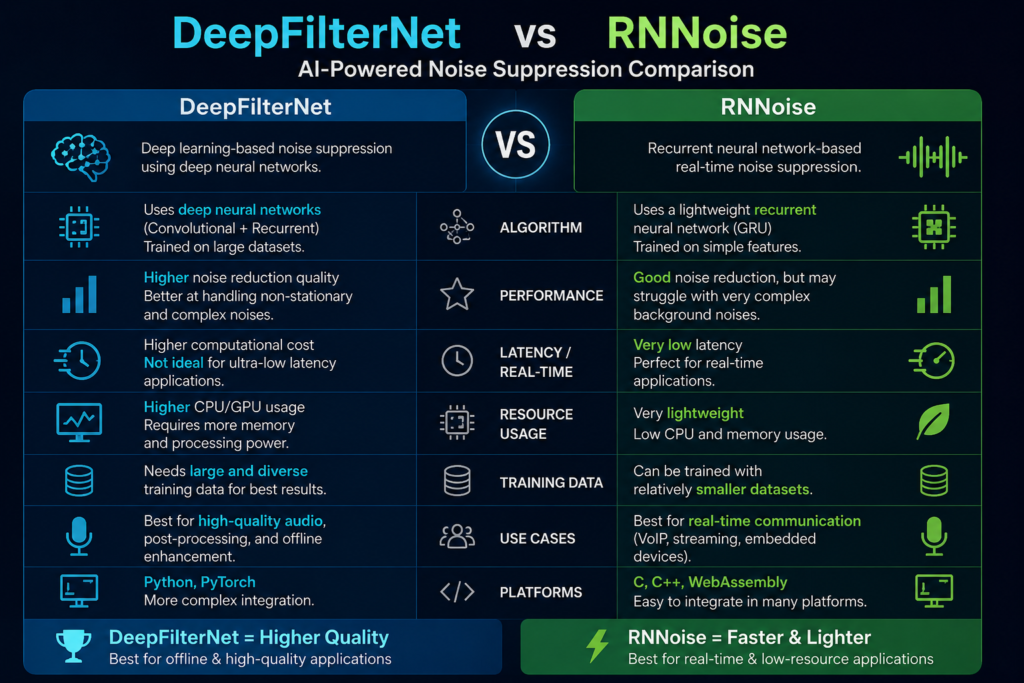
Two open-source AI noise removal models. Both free. Both used in real products. But they solve the problem in completely different ways — and choosing the wrong one for your situation costs you either audio quality or compute resources you can’t spare.
RNNoise came first. Mozilla released it in 2017 and it changed the game. For its time, it was remarkable — tiny, fast, effective, and free to use in commercial products. Then DeepFilterNet arrived from researchers at the University of Erlangen. Better quality, more complex, and designed to push past the ceiling RNNoise hits on hard noise.
This post breaks both down properly. Not just the specs — the real-world situations where each one wins and where each one falls short.
The Core Difference in One Paragraph Each
🔵 RNNoise: A tiny hybrid model — 85 kilobytes — that combines classic signal processing with three small GRU neural network layers. It groups audio into 22 frequency bands and applies a gain to each one, many times per second, to let voice through and pull noise down. Extremely fast. Runs on almost anything. Adds only about 10ms of latency. Best on steady, predictable noise.
🟢 DeepFilterNet: A heavier deep learning model from the University of Erlangen that processes audio in the full frequency domain using convolutional and recurrent layers. Instead of rough 22-band gains, it applies precise per-frequency filtering based on learned patterns. Adds about 40ms of latency. Requires more compute. Significantly better quality on complex, unpredictable noise.
In short: RNNoise is speed and simplicity. DeepFilterNet is quality. Neither is universally better — the right choice depends entirely on your hardware constraints and the type of noise you’re dealing with.
RNNoise — How It Works and What It’s Good At
RNNoise was built by Jean-Marc Valin at Mozilla in 2017. The idea was elegant: instead of building a massive neural network to process every frequency bin in audio, why not combine the efficiency of classic signal processing with a very small neural network to handle the parts that classic methods struggle with?
The result was something that fit in 85 kilobytes. For context, that’s smaller than most JPEG images.
How RNNoise Processes Audio
It takes audio in 480-sample frames at 48kHz — that’s about 10ms of audio at a time. For each frame it calculates 42 features: band energies, the speaker’s pitch, how voiced the sound is. Those features go into three GRU layers — a type of recurrent neural network well-suited for sequential data. The network outputs one gain value (between 0 and 1) for each of 22 frequency bands.
Think of it as a 22-slider equalizer. The AI moves all 22 sliders dozens of times per second — pushing down the bands where noise lives, leaving up the bands where voice lives. Simple in concept. Remarkably effective in practice for the noise types it was designed for.
There’s also a trick called pitch filtering — a comb filter tuned to the speaker’s vocal pitch — that cleans noise hiding between the harmonics of the voice. The coarse 22-band approach is too wide to catch those, so this extra step fills the gap.
RNNoise Performance Numbers
Where RNNoise Excels
Where RNNoise Struggles
Mozilla stopped actively maintaining RNNoise. Community wrappers and plugins exist, but the core library isn’t being updated. For long-term projects, this matters — bugs won’t be fixed and the model won’t improve.
DeepFilterNet — How It Works and What It’s Good At
DeepFilterNet came out of the University of Erlangen-Nuremberg in 2021. The researchers had a specific goal: beat the quality ceiling that simple band-gain models like RNNoise hit, while still running in real time without requiring a GPU.
The key insight was that 22 coarse bands aren’t enough. Real audio has hundreds of individual frequency bins. Voice and noise overlap in fine detail — detail that a 22-band gain can’t capture. DeepFilterNet operates at full frequency resolution instead.
How DeepFilterNet Processes Audio
It uses a two-stage approach. The first stage handles the overall envelope of the audio — the broad strokes of loudness across frequency ranges, similar in spirit to what RNNoise does but with finer resolution. The second stage — the “deep filtering” stage — applies a complex filter at full frequency resolution to handle the fine detail. This is what gives it the quality advantage.
The model processes audio in overlapping 20ms frames using a combination of convolutional layers (good at learning frequency patterns) and recurrent layers (good at tracking how sounds change over time). The whole thing runs with a real-time factor of around 0.19 on a modern CPU — meaning it processes audio about five times faster than it plays.
DeepFilterNet has gone through three major versions. DeepFilterNet3, updated in 2025 and 2026, is the current state of the art. It adds larger training datasets, more network layers, and refined perceptual optimization that handles complex modern noise sources — including dense urban environments and even AI-generated synthetic voices bleeding into recordings.
DeepFilterNet Performance Numbers
Where DeepFilterNet Excels
Where DeepFilterNet Has Limits
Good to know: DeepFilterNet is what powers Noise Reducer AI. When you upload a file and hit denoise, DeepFilterNet3 is the model doing the work — which is why it handles complex real-world recordings so well.
Head-to-Head — Category by Category
Noise Removal Quality
On simple, steady noise like fan hum or AC buzz, both models do well. RNNoise handles these cleanly and the quality difference is small. On complex noise — sudden sounds, overlapping voices, changing background chatter, music bleed — DeepFilterNet3 wins clearly. Research published in June 2025 (Sinergi journal) comparing the two directly in video conference conditions found DeepFilterNet3 achieved the best overall performance across every perceptual quality metric they measured.
✅ Winner: DeepFilterNet — especially on complex, non-stationary noise
Latency
RNNoise adds roughly 10ms of latency. DeepFilterNet adds roughly 40ms. For file processing — podcasts, video cleanup, recorded calls — latency is irrelevant. For live calls, 40ms is borderline. The ITU standard for acceptable one-way delay is 150ms total, so 40ms from the noise model is manageable but eats into that budget. For ultra-low-latency applications like broadcast or live performance, 10ms matters.
✅ Winner: RNNoise — 10ms vs 40ms is a real advantage for live audio
Model Size and Resource Use
RNNoise is 85 kilobytes. DeepFilterNet is around 2.3 million parameters — orders of magnitude larger. RNNoise runs 60× faster than real time on a desktop CPU and 7× on a Raspberry Pi. DeepFilterNet runs at a real-time factor of 0.19 — fast enough for real-time use on a modern CPU but not on minimal hardware. For IoT devices, embedded systems, or anything resource-constrained, RNNoise is the only practical choice.
✅ Winner: RNNoise — nothing comes close for efficiency
PESQ and STOI Scores
PESQ measures how natural the audio sounds to a human listener (1–4.5 scale). STOI measures how clearly the speech can be understood (0–1 scale). RNNoise scores around 3.88 PESQ and 0.92 STOI — impressive for its age and size. DeepFilterNet3 scores 3.5–4.0+ PESQ and above 0.95 STOI. Both are good. DeepFilterNet is measurably better on the metrics that matter for professional audio.
✅ Winner: DeepFilterNet3 — higher scores on both key audio quality metrics
Browser and WebAssembly Use
RNNoise has working WebAssembly builds that run fully in the browser with no server involved. It’s small enough that the download is invisible and processing is fast even on a phone browser. DeepFilterNet has browser integrations but the larger size means more engineering work and slower initial load. For browser-native applications where privacy matters (audio never leaves the device), RNNoise is the more practical choice right now.
✅ Winner: RNNoise — lighter and easier to deploy in the browser
Actively Maintained
Mozilla stopped actively maintaining RNNoise. The community has built wrappers and kept it alive, but the core hasn’t been updated in years. DeepFilterNet is actively developed — DeepFilterNet3 received major updates in 2025 and early 2026, with larger training datasets and better handling of modern noise sources. For projects that need long-term reliability and improvement, this matters.
✅ Winner: DeepFilterNet — actively maintained and improving
Handling Short Audio Clips
Both models need a minimum amount of audio to work properly — too short and there isn’t enough context for the model to understand what’s noise and what’s speech. DeepFilterNet3 handles clips as short as 80–100ms accurately. RNNoise works in 10ms frames but needs a few frames of context for best results. For short voice commands, clip trimming, or processing many short segments, DeepFilterNet3’s generalization is better.
✅ Winner: DeepFilterNet3 — better on very short audio segments
Full Comparison Table
Feature | RNNoise | DeepFilterNet3 |
|---|---|---|
Released | 2017 (Mozilla) | 2021, updated 2025/2026 (Erlangen) |
Architecture | Hybrid DSP + 3 GRU layers | CNN + GRU, two-stage deep filtering |
Model size | 85 KB | ~2.3M parameters |
Latency | ~10ms | ~40ms |
CPU usage | Minimal — runs on Raspberry Pi | Moderate — needs modern CPU |
PESQ score | ~3.88 | 3.5–4.0+ |
STOI score | ~0.92 | >0.95 |
Steady noise (fan, AC) | Excellent | Excellent |
Complex noise (voices, chatter) | Moderate | Excellent |
Echo and reverb | Limited | Strong |
Music bleed | Struggles | Handles well |
Browser / WebAssembly | Easy — small size | Possible, more effort |
Embedded / IoT devices | Yes | No |
Voice Activity Detection | Built-in (probability output) | Not built-in |
License | BSD — commercial use free | MIT — commercial use free |
Active maintenance | No — Mozilla stopped updates | Yes — updated 2025/2026 |
Best for | Live calls, embedded, low-power | File processing, quality-critical audio |
Who Should Use Which Model
Choose RNNoise if…
Choose DeepFilterNet if…
For most content creators — podcasters, YouTubers, vloggers, anyone cleaning up recorded files — DeepFilterNet is the right choice. The latency doesn’t matter when you’re processing a file rather than a live call, and the quality difference is audible on anything other than simple fan noise.
For developers building real-time voice apps in the browser or on constrained hardware, RNNoise is often the only practical option. Its efficiency is genuinely remarkable for what it does.
Real Scenarios — Which Model Fits
Scenario 1 — Podcast recorded in a home office with AC noise
The noise is steady and predictable. Both models handle this. But if there’s also some room echo and the guest occasionally had background chatter, DeepFilterNet gives you a cleaner result. For post-processing a recorded file, use DeepFilterNet. The 40ms latency is completely irrelevant here.
Scenario 2 — Live video call noise cancellation app
You’re building a real-time noise canceller for Zoom or Teams. Latency is critical — anything over 20ms starts to feel unnatural in conversation. RNNoise at 10ms is the right call. If you can run DeepFilterNet server-side and stream the result, that’s an option — but for client-side real-time processing, RNNoise wins.
Scenario 3 — Field interview recorded outdoors in a city
Traffic, wind, distant voices, changing ambient sound. This is exactly the complex noise scenario where RNNoise’s 22-band approach struggles. DeepFilterNet3’s full-frequency processing handles this much better. Upload to Noise Reducer AI (powered by DeepFilterNet) and the result is dramatically cleaner.
Scenario 4 — IoT smart speaker with noise suppression
The device has minimal CPU and no GPU. Every millisecond of processing time matters. RNNoise runs 7× faster than real time on a Raspberry Pi 3. DeepFilterNet won’t run cleanly in real time on that hardware at all. This is an easy call — RNNoise.
Scenario 5 — Browser-based privacy-first voice recorder
The audio should never leave the user’s device. You need in-browser processing with WebAssembly. RNNoise has mature, tested WebAssembly builds. DeepFilterNet has experimental browser integrations but requires significantly more engineering work and loads slower. RNNoise is the practical choice.
Scenario 6 — Post-production audio cleanup for YouTube video
You filmed at a location with music playing in the background, some room reverb, and varying ambient noise levels. You have the MP4 file. Quality is the priority and processing time doesn’t matter. DeepFilterNet3, every time. The quality gap over RNNoise on complex noise like this is clearly audible.
Can You Use Both Together?
Technically yes — but you shouldn’t stack them on the same audio signal.
Running one noise suppression model on audio and then passing the output through another one is a bad idea. Both models are trained on raw, unprocessed audio. When the second model receives audio that’s already been processed by the first, it doesn’t behave as trained. LiveKit’s own documentation warns against this explicitly — enabling two noise models on the same audio path can cause unexpected artifacts and degraded output.
Where using both makes sense is in separate stages of a pipeline — RNNoise handling the live call in real time, and DeepFilterNet cleaning up the recorded output file afterward. That’s a legitimate and effective approach. The live call gets 10ms low-latency noise removal. The exported recording gets a higher-quality second pass with DeepFilterNet before publishing.
Rule of thumb: One noise model per audio signal at a time. Use them at different stages of your workflow, not simultaneously on the same stream.
Frequently Asked Questions
Common questions about DeepFilterNet, RNNoise, and choosing between AI noise reduction models.